Document Foundry: Turning Construction Documentation Into AI-ready Data
Product
7
min read
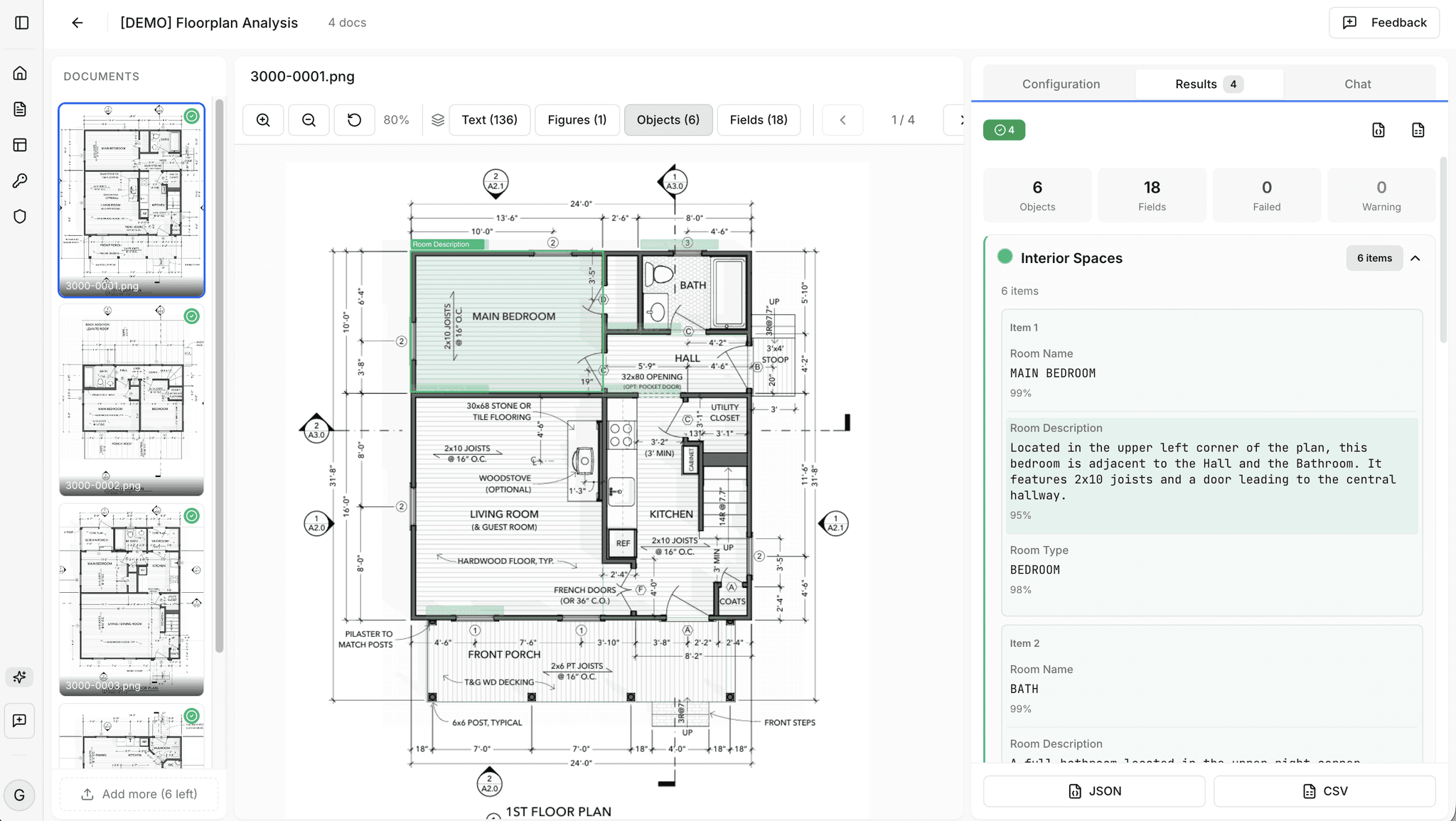
Document Foundry turns construction documentation into structured, machine-readable data. Drop a PDF. Define the schema you want. Get the data. No engineering team required.
Vision-language models keep getting better at reading PDFs. The gap between what they read off a typical document and what they read off a construction drawing is still real. We built Document Foundry to extract value inside that gap.
This post covers three things: how we measured where AI on AEC drawings actually works, why defining the right extraction schema is the bottleneck most tools never solve, and what Document Foundry does on a drawing right now.
Why AEC drawings resist AI
Construction drawings look unlike almost everything modern AI was trained on. Dense linework. Mixed orthographic and perspective views. Notes layered over geometry. Title blocks where the same field — sheet number, project name, revision — sits in a different position on every project, sometimes on every set. Symbol libraries vary by office, by region, by trade. All of it makes general-purpose AI extraction harder than the demos suggest.
Modern vision-language models read text well. They parse simple tables well. They struggle with symbol spotting, with layout-aware extraction across dense sheets, and with the small visual cues that carry the engineering content. A note next to a callout means something. A note three centimetres away from the same callout means something else.
These are limits in today's AI models. The gap between technological capability and real-life value is a moving target — models keep improving, and the orchestration around them keeps improving faster. We measured the gap precisely so we'd know exactly where to push.
What we measured: AECV-Bench
A claim about AI on drawings is opinion until you measure it. We measured it.
AECV-Bench is our benchmark for evaluating multimodal AI on real AEC drawings. Symbol spotting. Title block reading. Layout-aware extraction. Drawing comprehension. We built it because nobody else was measuring whether drawing AI actually works on the kinds of files an AEC professional opens on a Tuesday morning.
What the results reveal is consistent. Structured fields in standard layouts — title blocks, schedules, well-formatted tables — land high. Free-form symbol spotting on dense sheets, and layout-aware extraction across complex linework, remain hard for current frontier models. That isn't a single weak model. It is the state of the art.
We are not the only group measuring this. The wider research community is mapping AI's performance on AEC tasks at scale — public benchmarks now cover everything from single-sheet reading to multi-document agentic tasks. The territory is getting mapped. That is a good thing for everyone building tools that have to work on real drawings instead of cherry-picked demos.
Measurement tells us where to put engineering effort. Document Foundry is built around what we know works today — and engineered to absorb what gets better tomorrow.
Why schema definition is the bottleneck
A quick definition first. When you ask AI to extract information from a drawing, you have two options. You can ask it in plain language — "give me the sheet number and revision" — and hope the answer comes back in a useful shape. Or you can give it a schema: an explicit list of the fields you want and the format each one should take.
The schema is the contract between you and the model. With a schema, you get back a structured output — clean rows in a table, JSON your software can parse, fields your project tracker can ingest. Without it, you get prose.
Schemas matter for two reasons. They make AI extraction reliable — the model returns what you asked for, in the shape you asked for it, every time. And they make the output usable — auditable, comparable across drawings, ready to feed into analytics, takeoff, BIM, project controls, or any other downstream system.
Most AI extraction tools agree with that and then make schemas expensive to act on. Defining a schema typically means writing it in code, calling an API, iterating with engineers, and waiting for the next deployment cycle to see whether the change worked. By the time you find out the field names are wrong, you have burned a sprint.
Document Foundry is built differently. The user defines the schema. In a UI. Without writing code or touching an API.
Drop a drawing PDF. Describe the fields you want (even in natural language) - sheet number, project, revision, drawing type, custom field, anything. Run it. See the extracted output side by side with the source. Adjust the schema. Run it again. The loop that used to take a sprint takes minutes.
That changes what AI extraction is good for. The fastest way to find out whether AI works on your drawings is to try it on yours, with the schema you actually care about — not a generic demo on someone else's documents. We made that loop a workflow, not a project.
What Document Foundry does today
Document Foundry is focused. It does one thing: structured schema extraction from drawings. Here is what that looks like in production right now.
Title blocks. Sheet number, sheet title, project name, revision, dates, drawer, scale, and any custom field you define. Title blocks are the first thing most AI extraction tools get partially right and never fully nail. We started here because we had to.
Views on drawings. All the views from the drawing with their scale, description, annotations, etc.
Bills of materials from mechanical drawings. Tabular extraction tuned to MEP conventions — quantity, tag, description, unit, manufacturer where present.
Room data on plans. Room schedules, occupancy keys, finish keys — the structured data that lives on plans rather than in tables.
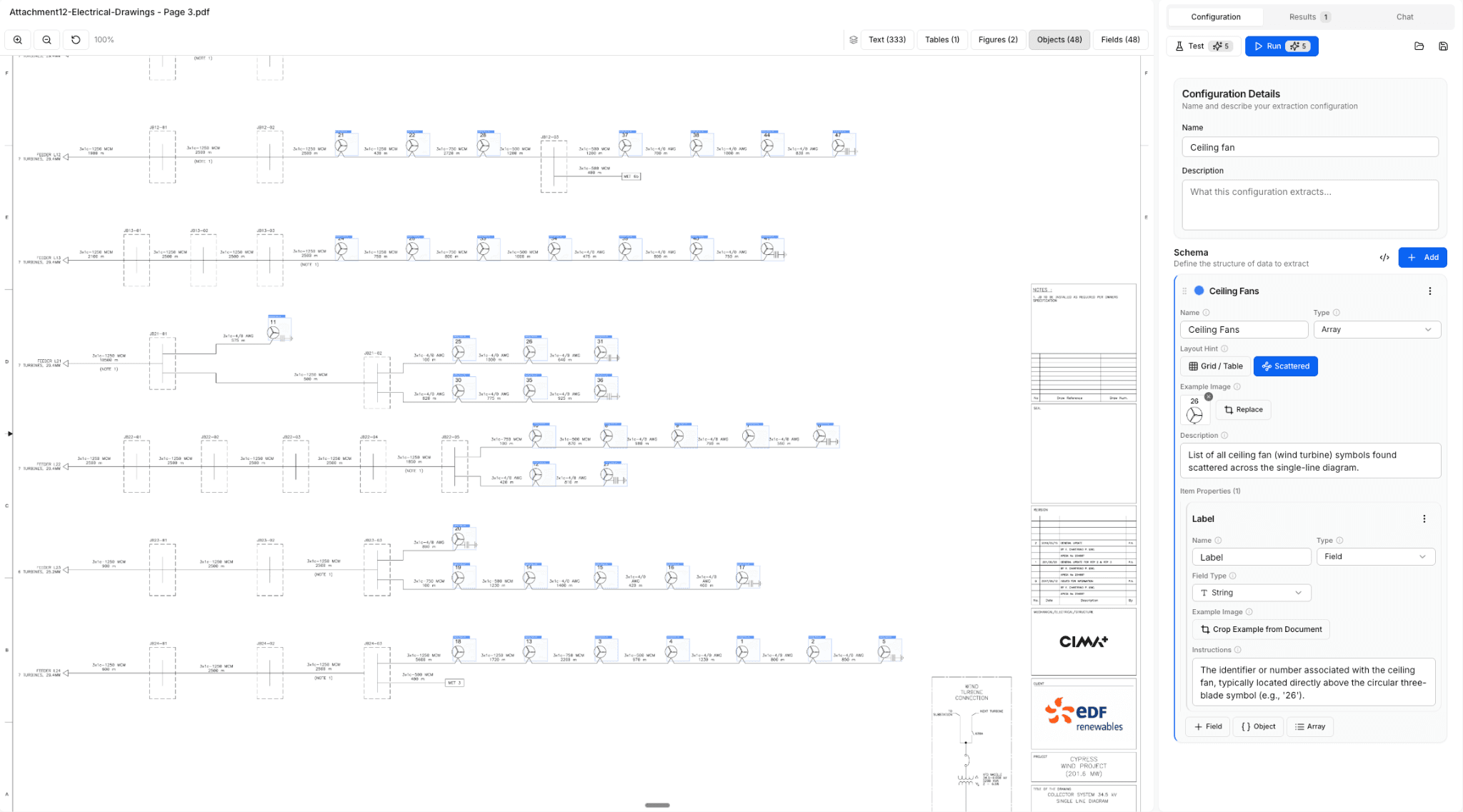
Custom schemas. If your project has its own fields — a non-standard revision matrix, a project-specific tag system, a custom field your office has used since 2009 — you can define it in the UI and run it on your drawings the same afternoon. Example below shows the extraction of all ceiling fans from the drawing after letting the model know how the ceiling fan symbol looks like.
What Document Foundry is strongest at is structured, layout-aware extraction. The fastest way to find out where it lands on your drawings is to run it. We are improving the harder cases as the underlying models get better and as we extend the orchestration around them. If you try Document Foundry and a particular category of drawing matters to you, tell us. That feedback shapes the roadmap.
Try it on your drawings
Sign up at document-foundry.aecfoundry.com and you get a credit allowance that covers several full workflows. Run them on your own drawings, with the schemas you actually care about. The credits are enough to see how the pipeline behaves on the documents that matter to you and the fields you need extracted.
If you want API access, volume processing, custom models tuned and evaluated against your own document corpus, or integration with the systems your team already runs — contact us.
Tell us where it works
Document Foundry gets better when we see the categories of drawings and schemas that matter to the people using it. If something works, tell us. If something doesn't, tell us that too. That feedback is the loop we want to be in.
Document Foundry is the data layer. The knowledge layer we are building on top of it is what makes AI on AEC drawings actually useful in production. More on that soon.