Your AEC Project Data Is Being Structured the Wrong Way for AI
Artificial Intelligence
6
min read

In the previous article, we argued that the knowledge which delivers a project sits scattered across incompatible systems, illegible to AI, and that no frontier model was trained to read it. The next step most teams reach for is the standard document-AI toolkit. Read the documents with OCR, turn them into embeddings, point a vision model at the drawings, and connect it all to search. Most AEC AI pilots start there, and most of them stall there.
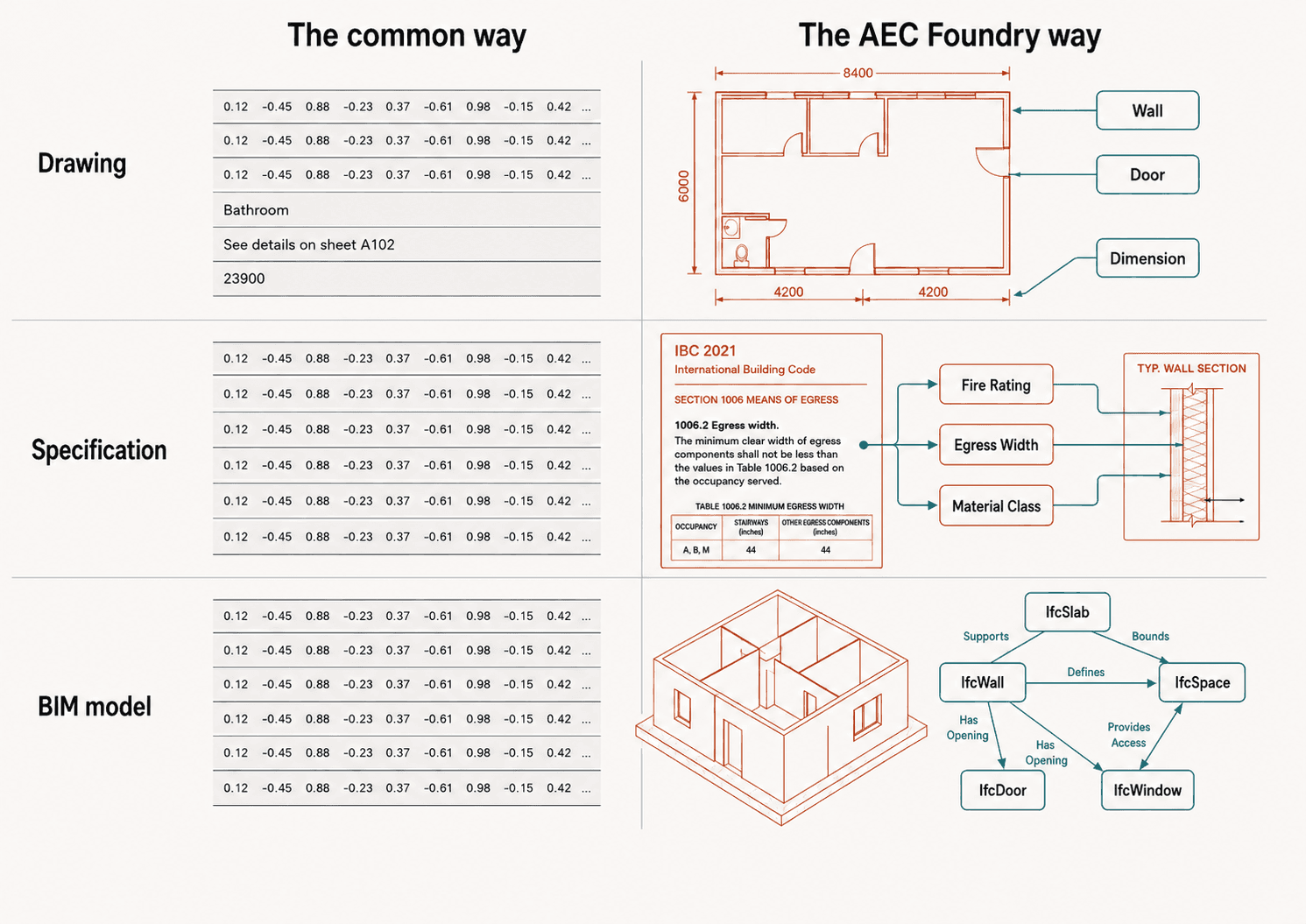
Each of those tools works on its own. The trouble is the layer they form together. Between your project and the AI, that layer prepares your documents for the model, and it was designed for other industries. It flattens your data. It takes drawings, specifications, and building models, all of which carry their meaning in how their parts connect, and irons that structure flat to fit a pipeline built for plain text. In AEC the structure carries the meaning, so flattening it throws the meaning away.
Look at where document AI has earned its keep. Finance, law, and customer support all run on text, read top to bottom, and the standard toolkit handles that well. Your work does not look like that. Your main document is the drawing, a picture made of symbols rather than a page of prose, and your work answers to compliance, where one requirement reaches across a specification, a building code, and a detail on a sheet. Point a text-shaped toolkit at a drawing set or a code-bound spec and it drops the part you needed.
A Drawing is Not a Page of Text
OCR, short for optical character recognition, turns a scanned page into machine-readable text. It reads prose, top to bottom and left to right. A drawing has no single reading order. It is a grid of views, callouts, tags, and references, where a detail bubble points to another sheet, a section mark ties an elevation to a plan, and a door tag means nothing without the schedule it refers to.
Run OCR across that and you get a pile of text in the wrong order, stripped of the logic that held it together. "A-301" reads as five characters. On the sheet it points to drawing A-301, and that pointer is what OCR throws away.
Vision Models Read the Picture, Not the Structure
A vision model layered on top reads the marks more fluently, and that fluency is easy to mistake for understanding. Ask it to describe a sheet and it will. Ask it to pull out every symbol, sub-detail, and cross-reference as structured items you can use, and it falls short. It learned from photographs and ordinary business graphics, not from the conventions of a construction set, so it captions the drawing instead of reading it. We covered why the training data looks like this last time.
Our own drawings benchmark, AECV-Bench, shows the limit. The best model on the board counts basic floor-plan objects at 54% exact-match accuracy, and drops to 43% on doors and 39% on windows, the symbols a junior drafter reads at a glance. Counting is the easy case: one symbol, one sheet, nothing to cross-reference. A model that cannot count the doors on a single plan has no chance of following one door through the schedule, the detail, and the spec, which is the work that pays.
We part ways with the default here. We do not point a general vision model at a drawing and hope. We use computer-vision models built for the medium, pulling out symbols, views, and sub-details in a form that matches how a drawing is organized, instead of forcing it through a method shaped by text-first industries.
Embeddings Flatten Compliance Documents
An embedding turns a chunk of text into a list of numbers that captures its rough meaning, so a search can fetch the passages closest to your question. That serves ordinary writing, where each paragraph stands on its own. A specification does not. The unit that matters in a spec or a building code is a requirement, and requirements ignore chunk boundaries: one chunk holds several of them, the next holds none. Much of what governs the work never appears as plain text. It sits in a table of values or a figure, so capturing a requirement in full means reading the text, the table, and the image together, and a text-only tool misses most of it.
A smarter search over chunks will not close that gap. What you want out of a specification is a set of clear, separate requirements, each tied to the clause it comes from and the detail on the drawing it governs, so the system can follow the trail an engineer follows. A list of numbers that calls two passages "similar" cannot do that. It fetches what reads alike, skips what connects, and breaks the chain from spec to code to detail where you most need it to hold.
IFC Is Already Structured, So Do Not Flatten It
3D model turns the problem upside down. IFC format already carries structure: it knows what is a wall, what is a space, what is a system, and how they connect. The structure arrives in the right form.
With the drawing and the spec, the mistake is forcing the wrong structure onto messy data. With a BIM model, the mistake runs the other way: you take data that is already structured correctly and break it apart. Turn an IFC model into text and embed it, and you melt a clean, connected model into a heap of strings. You would never load a database by rewriting its rows as paragraphs. Once the model is a pile of chunks, the connections are gone, and no search can rebuild them. So keep the BIM model whole, use the structure it already carries, and query it as the connected model it is.
The Connections Are the Content
All three failures share a cause. Reading order on a drawing, the trail from spec to code to detail, the connections inside a model: flatten any of them and you keep the noise and lose the signal.
A bigger model or a longer context window will not rescue the approach. A longer window holds a bigger flattened version of your project, more text in and the same missing structure. The limit was never how much the model reads at once. Reading a project is not the same as finding your way around it.
Keeping the Structure
The alternative is not complicated. Pull each document into a form that holds its structure. Turn the symbols and references on a drawing into clear items with links between them. Hold each requirement as its own object, tied to the clause and the detail it touches. Keep the BIM model whole. Then let search follow those links instead of guessing by resemblance.
Two things come from working this way. First, trust: an answer you can trace back to the exact sheet, clause, or model element is the only kind worth acting on, and you can trace it only if the links survived extraction. Second, staying power: the work of extracting your data while holding its structure compounds over time and resists copying, while the model sitting on top of it grows more swappable each year.
Turn a structured project into a flat blob of text, on the back of an approach borrowed from industries that never handled data like yours, and you have paid to destroy your own advantage. You will feel it where the work is hardest and the connections densest. Keep the structure instead, and a model can move through your project the way your best people do.
From Structure To a Layer Agents Can Use
Keeping the structure is the starting point. Next time we put the constructive side into one picture: the single connected layer all of this builds toward, where drawings, specs, codes, and models join into one whole, and what that lets AI agents do once the structure survives.
If you want to see what this looks like on your own drawings, specifications, and models, that is where we like to start.